
Excel template for project procurement
Know the last safe date to issue every RFQ on your project
Enter each package’s Required-on-Site date and lead time. The Plan Builder works backwards through transit, inspection, manufacturing, award, evaluation and bidding, gives you the latest PO and RFQ dates, and flags what is already late.
Launch price for the first 25 buyers, then $54. One-time payment, no subscription.
- Download link emailed after payment
- Excel 2016+ or Microsoft 365
- No macros
- Secure checkout by Paddle
Want to try it first? Get the free Lite template (Excel, up to 10 packages) →
Sound familiar?
Procurement plans often fail quietly, months before anyone notices
A long-lead package nobody flagged
The compressor takes 52 weeks to build and site needs it in 15 months. The RFQ still hasn't gone out, and by the time someone does the maths the float has gone.
The plan lives in five spreadsheets
Package list in one file, dates in another, approval limits in an email. Nobody can see at a glance what is late.
The client wants a Procurement Plan at kick-off
And you are starting from a blank Word page, again.
What it does
One workbook from package list to procurement plan
Works backwards from the site date
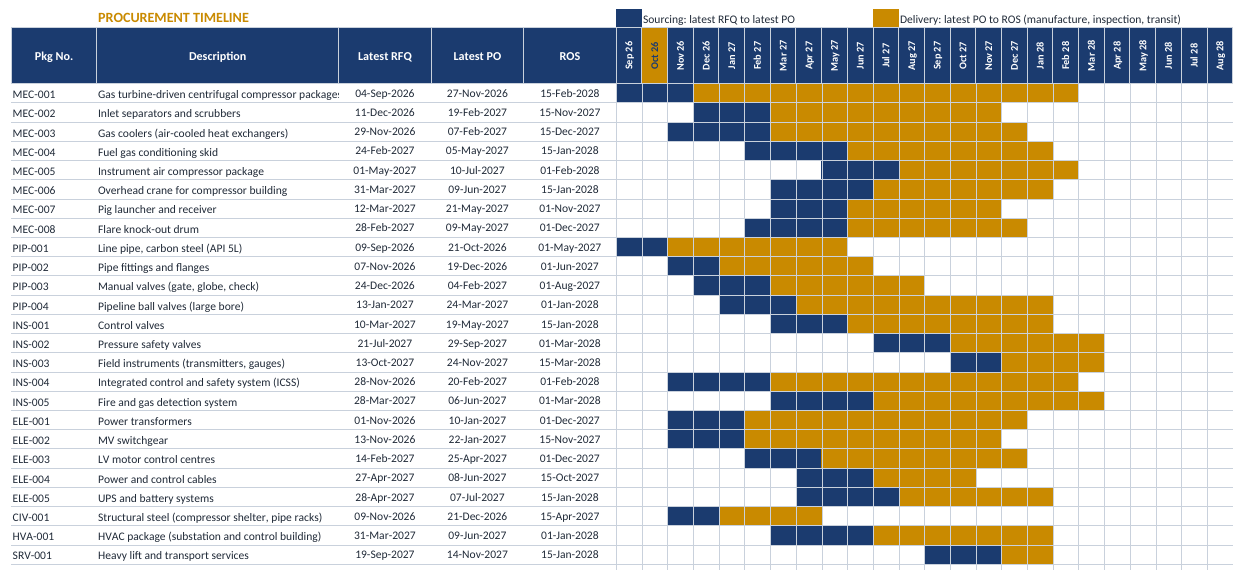
Every package gets its latest PO date, latest RFQ issue date and the day RFQ preparation must start. Durations come from your own planning rules.
Latest RFQ = Latest PO − award − evaluation − bid period
Flags that tell you where to look
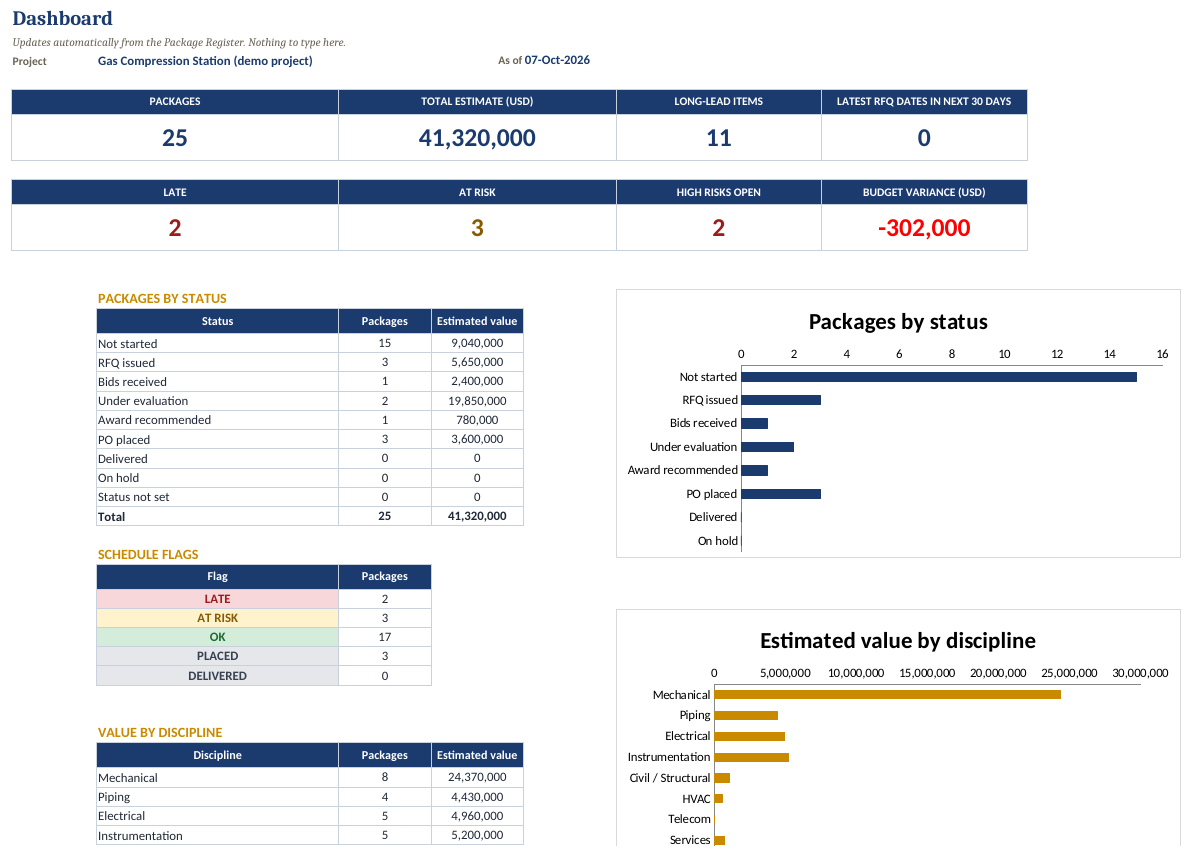
Each package is marked LATE, AT RISK, OK, PLACED or DELIVERED by comparing your planned dates with the latest dates. Long-lead items get their own list, worst float first.
A plan you can hand to the client
A 12-section Procurement Management Plan template in Word, with guidance and worked EPC examples. The workbook adds approval limits (RACI), a risk register and a budget check.
See it working
Comes with a fully worked example
The demo workbook is filled in for a 25-package gas compression station, so you can see every sheet working before you type in your own project.
What you get
Everything in one download
| File | What it is for |
|---|---|
| Plan Builder workbook (blank) | Your working file: 10 sheets, room for 150 packages. |
| Plan Builder workbook (demo) | The same workbook filled in for a 25-package gas compression station, so you can see every sheet working. |
| Procurement Management Plan (Word) | 12 sections with guidance boxes and examples, ready for your project details. |
| Quick-start guide (Word) | Set your project rules in about 15 minutes, step by step. |
| License & Support | What you can do with the files, compatibility, and how to get help. |
The 10 sheets in the workbook
How it works
Three steps, about 15 minutes to set your rules
Set your rules
On Project Setup, enter the key dates and your standard durations: RFQ preparation, bid period, evaluation and award by category, inspection by level, transit by shipping mode.
List your packages
On the Package Register, add each package with its Required-on-Site date, manufacturing lead time, shipping mode, inspection level and status. Dropdowns keep entries consistent.
Act on the flags
The schedule, long-lead list and dashboard fill themselves in. Deal with anything LATE or AT RISK first, then copy the key tables into the plan document.
Who it is for
Built for the people who own the package list
- Procurement leads and buyers on EPC and capital projects
- Project engineers and planners who own the equipment list
- Consultants who prepare procurement plans for clients
Not the right tool for
When to use something else
- Day-to-day PO chasing after the order is placed (that is what the Vendor Expediting Tracker is for)
- Comparing bids line by line (use the RFQ & Vendor Comparison Toolkit)
- Teams that need a multi-user online system
Why trust the logic
Built from 35 years of oil & gas EPC procurement practice
The durations, categories and flags follow how capital-project procurement actually runs: long-lead equipment first, inspection and transit counted before the PO date, and approvals set by value. The demo is fictional; the method is not.
Your procurement toolkit
Plan it, buy it, chase it
Licence
What your licence covers
| Included (Individual License) | Not included |
|---|---|
| One person using the Plan Builder on unlimited projects, on their own devices | Sharing your copy with colleagues, clients or a team as a group resource (needs the Team License below) |
| Using the plans, schedules and reports you create for your employer or your own clients | Reselling, redistributing, repackaging or sublicensing the files, original or edited |
| Free minor updates (bug fixes, small formula corrections) to the version you bought | Major new versions, which may be offered at a reduced returning-customer price |
Team License: $135 for up to 5 people
Up to 5 people in one organisation can use the Plan Builder on unlimited projects and keep it on a shared internal drive. That is $27 per person. For a bigger team, add one Team License for each further group of up to 5.
Refund: if a file does not work as described, email support@aisavestime.com within 14 days of purchase and we will fix it or refund you in full. Full terms are in the License & Support file in your download.
Questions
Frequently asked questions
Which software do I need?
Microsoft Excel 2016 or later, or Microsoft 365, plus any app that opens Word files. The workbooks use formulas only, so there are no macros to enable. LibreOffice Calc also works. Google Sheets is not supported.
How many packages can it handle?
150 packages per workbook. For a larger project, use one copy per area or discipline.
Can I change the durations to suit my company?
Yes. All durations sit on the Project Setup sheet: RFQ preparation, bid period, evaluation and award by category, inspection days by level, and transit days by shipping mode. You can also override transit or add extra days for a single package.
Is this a subscription?
No. You pay once ($36 at the launch price) and keep the files. Minor updates to the version you bought are free.
How do I get the files?
Straight after payment you receive an email with your download. If it hasn’t arrived within a few minutes, check your spam folder, then email support@aisavestime.com.
What if it doesn’t work for me?
If a file doesn’t work as described (for example a broken formula, or a file that won’t open in a supported version of Excel), email support@aisavestime.com within 14 days of purchase. We will fix it or give you a full refund.
Can I use it on client projects?
Yes. Consultants can use the plans and schedules they create for their own clients’ projects. Sharing the workbook itself with a team needs a Team License ($135 for up to 5 people).
Is there a free version?
Yes. The free Lite version covers 10 packages with the Package Register and Backward Schedule, so you can try the method first. Get the free Lite version.
How is this different from the Command Center?
The Project & Procurement Command Center runs a project week to week: risks, budget variance, vendor scores and status reports. The Plan Builder comes first. It sets out what you will buy, how, and by when.
Get your procurement plan out of five spreadsheets and into one
Launch price for the first 25 buyers, then $54. One-time payment, no subscription.
- Download link emailed after payment
- No macros
- 14-day works-as-described guarantee
Not ready yet? Try the free Lite version (10 packages).