
The RFQ Edge Method
A downloadable PDF guide with 44 ready-to-use AI prompts to help you define requirements, review supplier quotes, prepare negotiations and document purchasing decisions. Use the prompts in an AI service your organisation permits.
PDF guide + copyable prompts · External AI service required for prompt use · USD 18 one-time launch price
See what you receive
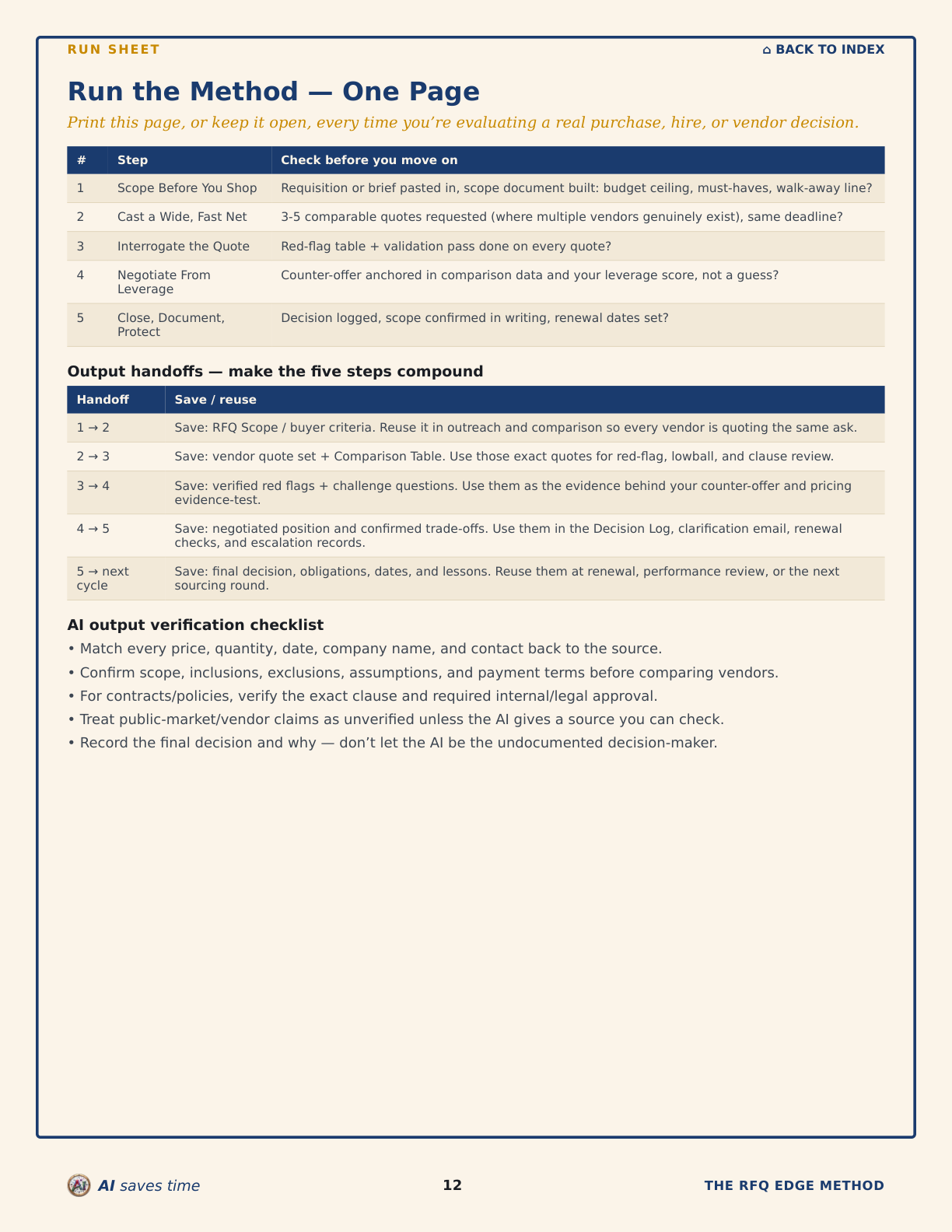
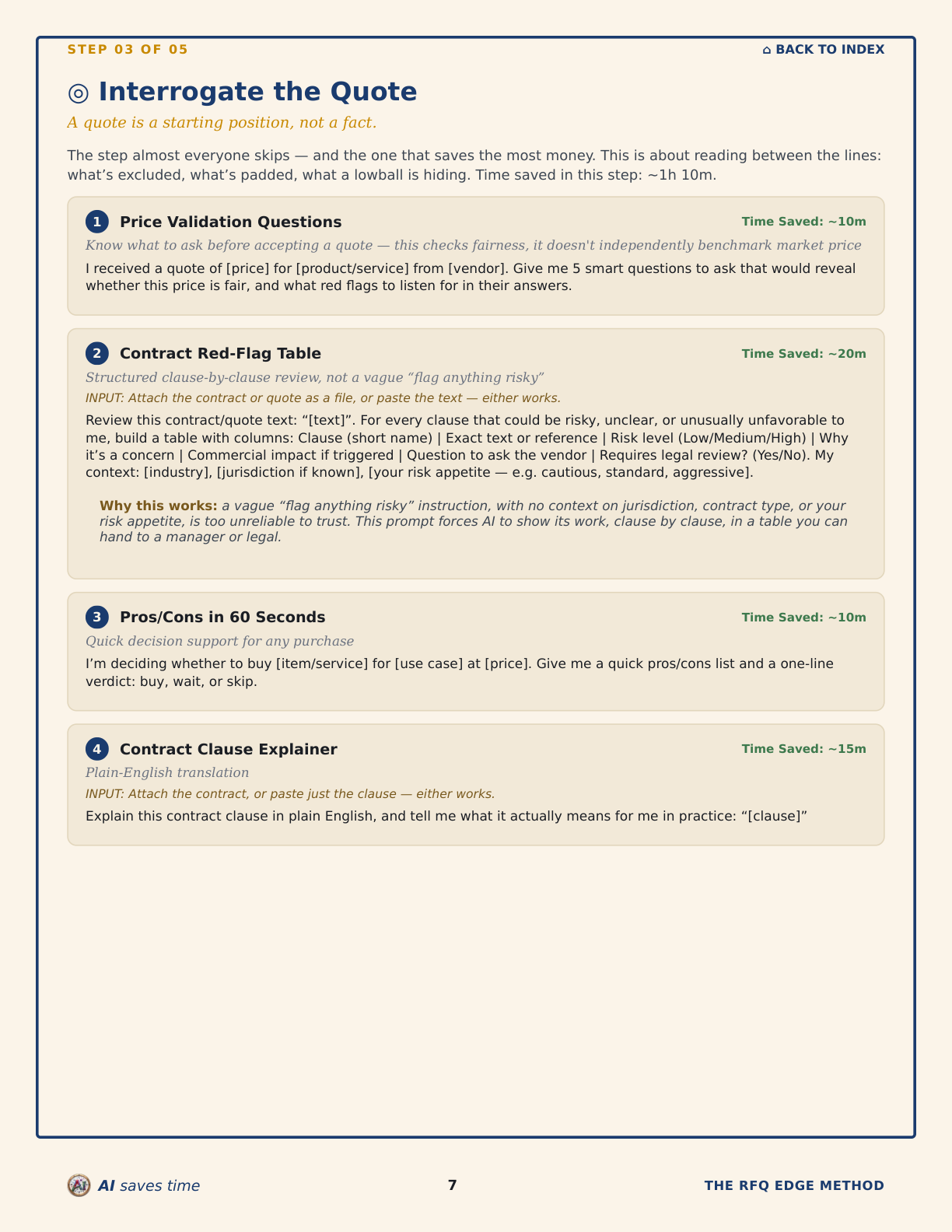
A 5-step system to structure vendor evaluation, negotiation and close-out — with reusable AI workflows for the work that normally takes the most time.
A 5-step system you and your team can run on any vendor, contractor, or software decision — built from 35 years inside real procurement negotiations.
A quote is a starting position, not a fact. Most teams find that out after they’ve signed. The RFQ Edge Method is the same structured process procurement teams run before committing to a purchase — five steps, applied to any vendor, freelancer, contractor, or software decision you and your team are evaluating.
No install. No IT ticket. No company account required to read the guide. Reading the PDF and filling in your own notes never touches your employer’s systems. Running a prompt is the one step that involves an outside service — paste it into whichever AI account your employer permits (a company-approved workspace, or your own, depending on your organisation’s policy).
The 5 steps
1. Scope Before You Shop — Define what “good” looks like before you talk to a single vendor. The most common mistake in any purchase: comparing quotes before agreeing, even with yourself, on what you’re actually buying.
2. Cast a Wide, Fast Net — Whenever the market allows, create credible alternatives before you negotiate. Competitive tension is one of the strongest sources of buyer leverage — a single-vendor position (sole-source suppliers, OEM restrictions, approved-vendor lists) is sometimes unavoidable, but when you do have a choice, evaluating just one option gives the vendor most of the leverage.
3. Interrogate the Quote — The step almost everyone skips, and the one that saves the most money. What’s excluded, what’s padded, what a lowball is hiding.
4. Negotiate From Leverage, Not Emotion — You already built leverage in Step 2. This is where you use it without burning the relationship.
5. Close, Document, Protect — The follow-through step that turns a good deal into a protected one. Write down what was agreed, and set the reminder that catches the renewal before it costs you.
Who it’s built for
Built for procurement leads, project managers, and contract/vendor owners evaluating a purchase decision on their employer’s behalf. Every prompt assumes you and your team are the buyer.
The 44 prompts below are the delivery mechanism, not the product. What you’re actually getting is the judgment behind them — knowing what a quote is hiding, when a vendor has room to move, what to check before a contract auto-renews — built from 35 years on the other side of the negotiating table.
A sample prompt from the guide
This is one of the guide’s 3 signature prompts, shown exactly as it appears in the PDF — Step 3, “Interrogate the Quote”:
Lowball Detector (Why a Quote’s Suspiciously Cheap) — SIGNATURE · ~15m
A suspiciously cheap quote is a risk, not a win — separate hypothesis from evidence.
INPUT: Attach the quotes as files, or paste the text — either works.
“This quote is noticeably lower than the others I’ve received: [quote], compared to [other quotes/price range]. List the plausible explanations, ranked by how much each should worry me. For each one, give me: the evidence that would confirm it, the specific question to ask the vendor to test it, and the risk to me if it turns out to be true. Do not claim to know which explanation is correct — these are hypotheses to verify, not conclusions.”
The guide’s worked case study (pages 4–9) runs this same prompt against a real fictional scenario — a vendor quote AED 296,000 below the other two — and shows the actual output: a missing commissioning line item and a shorter warranty period, not a disqualifying red flag, but grounds to renegotiate scope before comparing price again.
What’s inside
- The 5-step method in full, as the spine of the guide.
- 44 copy-paste prompts, sorted under the step they actually serve — not a flat list. Every prompt links directly from the index, so you jump straight to the one you need instead of scrolling.
- Prompts built to work from documents you already have — attach or paste your purchase requisition, material requisition, RFQ scope, or the actual vendor quotes you’ve received, and the AI pulls out the goal, the scope, and the comparison — instead of retyping details into brackets by hand.
- The 3 signature prompts built for this system: the Leverage Audit, the Lowball Detector, and the Renewal Trap Finder.
- The Extended Admin Toolkit, organized into 5 topics — Supplier Interaction, Reporting, Purchasing, Meetings, Personal Efficiency — instead of a generic category list, including a formal vendor performance warning letter, a liquidated damages notice, and a critical-path/milestone summary builder for vendor schedules.
- Every prompt shows an estimated time saved for that individual task. These are internal task-time estimates, not a measured result, and they are not meant to be added together into a single saving.
- A one-page “Run the Method” checklist you can keep open while you work.
Format: PDF, with the full method and 44 ready-to-use prompts, fully linked for fast navigation. Works with ChatGPT, Claude, or any AI chat tool.
Delivered instantly after purchase.
Launch $18 $27
Delivered by email within a few minutes — check your spam folder if you don’t see it.
Secure checkout powered by Paddle. Instant download after payment.
Try it free first
Not ready to buy? See how you and your team’s negotiating leverage scores with the free Supplier Negotiation Leverage Calculator before your next call.
Open the free Leverage Calculator →
FAQ
Will this cause problems with my company’s IT policy?
The guide and prompts run entirely on your own device — no install, no company account. For steps that involve pasting content into ChatGPT, Claude, or another AI service, follow your employer’s AI, confidentiality, and data-handling policies, and don’t paste confidential company, supplier, or commercial information unless your organization permits that service.
How do I use the prompts?
Copy any prompt into ChatGPT or Claude, replace the [bracketed] placeholders with your details, and run it in sequence with the step it belongs to. For the scoping and comparison prompts, the fastest way is to attach a document you already have — your purchase requisition, a vendor’s quote — directly in your AI chat, or paste it in if you’d rather. Either way, the AI pulls out what it needs instead of you retyping it.
Do I need procurement experience to use this?
No. The method does the structuring — you bring the decision, the guide brings the process.
What format is the guide in?
A single PDF you can keep on your desktop, phone, or print out, plus a plain-text version for fast copy-paste.
I need the spreadsheet version of the comparison and red-flag steps — is that included?
Steps 2 and 3 (the comparison and red-flag check) are also available as a hands-on interactive tool — see The RFQ & Vendor Comparison Toolkit.
Structured sourcing and evaluation processes help buyers compare suppliers consistently, document decisions and reduce avoidable procurement risk.
Most teams have never had access to that process — until now. The RFQ Edge Method puts the same 5-step system in your hands. The guide itself needs no software install and no company account — running a prompt uses whichever AI service your organisation permits.